Build integration
DDD is not a tool somebody runs by hand before a release; it is a step of the build, in the same way the compiler is. The generated globals have to be regenerated whenever a component changes its declarations, the check has to fail the build rather than a review, and the a2l that goes out with an image has to be the one generated from the components that image actually links. Two integrations are shipped for that: a cmake module that turns the whole workflow into two calls, and a docker image that proves the generated c really compiles.
cmake
Which components an image is made of is already written down in the build system - it is the link graph. A project description that repeats that list by hand is a second source of truth, and it drifts the day somebody links a new component without remembering the json file. The cmake module therefore reads the list out of the link graph: a component registers its own description on its own target, and an image collects the descriptions of everything it links.
The module lives in cmake/Ddd.cmake and is found through CMAKE_MODULE_PATH. Because a
project may be built against several installations of the tool, the directory is printed by
the tool itself rather than guessed:
$ ddd cmake-dir
/home/you/ddd/cmake
list(APPEND CMAKE_MODULE_PATH "/path/to/ddd/cmake")   # what `ddd cmake-dir` printed
include(Ddd)
Including the module looks for the ddd executable and remembers it in the cache variable
DDD_EXECUTABLE. Configure with -DDDD_EXECUTABLE=<path> to pin a particular
installation - the one of a virtual environment, or a small wrapper script running
python -m ddd. The module then asks it for its version and refuses, naming both, a tool
of another release than the module’s own: the two are one release, and a project that copied
Ddd.cmake into its tree - which the line above invites - otherwise finds out at build
time, in an unrecognized arguments from the tool’s argument parser, or does not find out
at all and builds under the option set of a release nobody is running. The module needs CMake
3.20 and says so at include time; collecting the
components through the link graph (below) needs CMake 3.30. A cross-compile toolchain file
that sets CMAKE_FIND_ROOT_PATH_MODE_PROGRAM ONLY keeps find_program from seeing host
tools, so such a project either allows host programs (BOTH) or passes
-DDDD_EXECUTABLE=<path> explicitly.
Registering a component
ddd_add_component(<target> JSON <file>...) attaches one or more description files to the
target of a component. The files must be named *.ddd.json and, unless they live in the
build tree and are generated later, must exist at configure time; a violation of either is a
fatal error, because the alternative is an image whose data dictionary is quietly incomplete.
A vocabulary file registers the same way - a units, sections,
constants, rasters or types file is a *.ddd.json like any other, and the call takes it
without asking what is inside. Which target it belongs on is the question a project meets on
its first shared units file, and the answer follows from the collection: only what an image
links reaches it. A vocabulary the whole device shares therefore goes on a target every
image links - an interface library the components link for nothing else, or the image target
itself, whose own registrations are collected along with the closure’s:
add_library(device_vocabulary INTERFACE)
ddd_add_component(device_vocabulary JSON units.ddd.json sections.ddd.json)

add_library(sensor_hub STATIC sensor_hub.c)
target_link_libraries(sensor_hub PRIVATE device_vocabulary)
ddd_add_component(sensor_hub JSON sensor_hub.ddd.json)
Hanging it off whichever component happened to need it first works only for as long as every
image links that component - a condition nobody writes down, and one the first image that
does not link it discovers as an unknown-unit error.
Registering a component also creates the on-demand target <target>.ddd, which checks that
component on its own - useful long before it is integrated, and useful to a supplier who does
not have the rest of the project at all. That check runs ddd check --standalone, which
holds back the checks that need every component of the project: a component in isolation has
nobody on the other side of its interface, and the types, units, sections, constants and
rasters it names may live in files the supplier does not have. Which checks those are is
declared in the registry - ddd checks marks each one (project), and
Editor integration names the nine the editor holds back for the same reason - and
everything else, from datatypes and conversions to initial values and bitfields, is verified
as usual.
A registered vocabulary file is left out of that target: it declares no interface, so handing
one to ddd check is a file-kind error the target could never pass. Such a file is
checked in context instead, through the project of every image that collects it, and a target
that registers nothing else keeps a <target>.ddd that does nothing.
Which kind a file is is read at configure time, so a file whose json does not parse at all
says nothing about itself. It is checked like a component, because what is wrong with it is
exactly what that check reports: ninja <target>.ddd names the line and the column, and
the same target run after the repair checks the repaired file, without configuring again.
Generating an image
ddd_generate(<image> ...) collects the descriptions of every component in the link closure
of the image, writes the project description tying them together, runs the generator - ddd
generate all, so the artefact of every plugin named with PLUGINS arrives beside the
built-in files - and links the result back into the image. A plugin’s file names are its own
and are not declared as outputs, so a target that consumes one depends on
<stem>_ddd_generation - the helper targets are named after the image without its
extension, so firmware.elf gives firmware_ddd_generation. It has to be called in the
CMakeLists.txt that defines the image, and after the components have been added, because
it hands <stem>_ddd_headers to the components registered up to that point - which settles
both which components get the generated headers and whose compile usage travels with them.
Besides the image it needs one thing: TEMPLATE_DIRECTORY, the directory of jinja2 templates
the generated c code is rendered from. It is required and has no default, because the
alternative would be a build whose generated sources change the day the tool is upgraded. What
that code looks like belongs to the project, so the project says where the templates are.
The example below is examples/cmake/CMakeLists.txt from the source distribution, with its
comments removed; it is what the cmake compose service configures and builds:
cmake_minimum_required(VERSION 3.30)
project(DddCMakeExample LANGUAGES C)

list(APPEND CMAKE_MODULE_PATH "${CMAKE_CURRENT_SOURCE_DIR}/../../cmake")
include(Ddd)

set(CMAKE_C_STANDARD 11)
set(CMAKE_C_STANDARD_REQUIRED ON)
if(NOT MSVC)
    add_compile_options(-Wall -Wextra -Wpedantic -Werror)
else()
    add_compile_options(/W4)
endif()

set(descriptions "${CMAKE_CURRENT_SOURCE_DIR}/../demo")

set(templates "${CMAKE_CURRENT_SOURCE_DIR}/../templates")

add_library(sensor_hub STATIC components/sensor_hub.c)
target_include_directories(sensor_hub PUBLIC "${descriptions}/include")
ddd_add_component(sensor_hub JSON "${descriptions}/components/sensor_hub.ddd.json")

add_library(controller STATIC components/controller.c)
target_link_libraries(controller PRIVATE sensor_hub)
ddd_add_component(controller JSON "${descriptions}/components/controller.ddd.json")

add_library(user_interface STATIC components/user_interface.c)
target_link_libraries(user_interface PRIVATE controller)
ddd_add_component(user_interface JSON "${descriptions}/components/user_interface.ddd.json")

add_library(event_logger STATIC components/event_logger.c)
ddd_add_component(event_logger JSON "${descriptions}/subsystems/logging/event_logger.ddd.json")

add_executable(firmware.elf main.c)
target_link_libraries(firmware.elf PRIVATE user_interface event_logger)

ddd_generate(firmware.elf
             NAME DemoDevice
             TEMPLATE_DIRECTORY "${templates}"
             SCHEMA_DIRECTORY "${CMAKE_CURRENT_BINARY_DIR}/schemas")
sensor_hub.c then writes #include "SensorHub.h" and nothing else: the header DDD
generated for that component is the one it is meant to include, and a variable it never
declared is one it has no business naming. The isolation is by convention rather than by
construction - what travels to each component is the output directory, one include path
carrying every component’s header and the shared ones beside them, so #include
"Controller.h" from another component’s source compiles. What the build does guarantee is
that the directory holds the headers of this image and no others: a component dropped from
the link graph stops being generated and its header is taken back at the next build (see
What a run owns), so the include that reaches across is at least an include of a
component the image really links. Handing each component a directory of its own would make
the convention a rule, at the price of one include directory per component; that is not what
this module builds. The include directory travels to the components automatically - and with
it, in the collected mode, the compile usage those headers need to be read - which is what
keeps the integration down to two lines per component.
That last part is what the demo’s external type is for. SensorHub declares one, so
sensor_hub is the component that publishes the directory holding the vendor header defining
it. DDD writes that header’s include line into ddd_types.h, and every component’s generated
header includes ddd_types.h - so event_logger compiles it too, although it neither
links sensor_hub nor names the type itself. Nothing hands that directory to
event_logger here. Take it out of what ddd_generate() collects and the build stops on a
header it cannot find.
The templates this example points at are the ones DDD ships as examples, since it sits next to them in the source tree. A real project keeps its own under version control, next to its sources, and starts them off as a copy of that set.
The project description that ties the collected components together is written into the output
directory as <NAME>.ddd.json. It is an ordinary project file, so what an image was
generated from can be read afterwards, and checked, dumped or compared like any other.
What the template directory decides
A build system has to know which files a step produces before it runs it, and now that the
templates come from the project, that list is written down in the project as well. The module
reads the template directory at configure time and derives everything it declares from the
names it finds there. The directory has to exist by then; ddd templates-dir prints a
working set to copy into a project that has none yet, and Templates describes what the
templates receive. There is no equivalent option for the a2l, and that asymmetry is deliberate:
the structure of an a2l is dictated by ASAM rather than by a house style, so that generator
stays internal.
The templates are collected with file(GLOB ... CONFIGURE_DEPENDS "<dir>/*.jinja2"), so a
template added or removed is noticed by the build itself instead of by whoever remembers to
re-run cmake. The same files are dependencies of the generation step, which makes a template
behave like any other source: change the banner of ddd_globals.c.jinja2 and the next build
regenerates the file and recompiles it.
The names of the templates are then turned into the declared outputs, minus the two kinds that
cannot be named at configure time. A helper - a name starting with an underscore, such as
_macros.jinja2 - renders nothing of its own, and a {component} template renders once
per component, under names that only exist once the description files have been read. That
second case is exactly why the per-component headers reach their consumers through the
interface library rather than as declared outputs. Everything else contributes one output
named like its template without the .jinja2 extension, and every output ending in .c
is compiled into the object library that ends up in the image - so a project splitting its
definitions over two source templates gets both of them compiled, without saying so anywhere.
Three arrangements are refused with a message rather than with a confusing failure later on: a
directory holding no *.jinja2 file at all, a directory holding nothing but helpers and
{component} templates, from which no output could be declared, and a directory in which no
template produces a .c file - the definitions of the global variables have to be compiled
into the image, so one template must produce a source file.
Collection follows the link graph
The description files are attached to a component target as a transitive usage requirement:
they travel through the link graph the same way an include directory or a compile definition
does. An image therefore collects exactly the components it links - no more, and, more
importantly, no less. An image linking only sensor_hub gets SensorHub.h and an a2l
holding SensorHub’s variables, and controller does not appear in it at all.
That mechanism is the custom transitive property DDD_JSON, built on the
TRANSITIVE_LINK_PROPERTIES feature introduced in CMake 3.30 - the floor of the
collected mode, on top of the CMake 3.20 the module itself needs. The module checks it and
stops with a fatal error on an older cmake instead of
carrying on, because an older cmake would silently collect an incomplete set of components,
and an incomplete data dictionary is exactly the failure DDD exists to prevent.
The property is resolved at generate time, when the link graph is known but nothing has been compiled yet, so the generation never waits for an object file. There is no dependency cycle either, even though the components depend on the headers generated out of their own descriptions: unlike a tool that reads compiled objects, DDD only ever reads the json files.
A hand written project description
A project that already maintains its own project description - because it is also built with
another build system, because it deliberately lists more than the image links, or because it
carries project-level extensions, the one key the generated description does not - passes
it with PROJECT <file>. That mode needs neither cmake 3.30 (3.20, the module’s own floor,
is enough) nor ddd_add_component, and the
a2l and the dictionary are then named after the project name inside the description, so a
NAME given as well is ignored with a status message.
A hand written project pulls its components in through includes, possibly with wildcards,
so the project file alone would be a wholly insufficient dependency. The module therefore asks
the tool which files the project is really built out of, with ddd sources (see
Command line interface), and uses the answer twice: as the dependencies of the
generation step, so that editing a component - or a plugin the project names, whose module
the answer lists too - regenerates the globals and the a2l, and as
CMAKE_CONFIGURE_DEPENDS, so that adding a file matching an includes wildcard re-runs
configure and picks the new component up. If the tool cannot resolve the project yet, the
module says so and falls back to depending on the project file alone rather than refusing to
configure at all.
What the build tells an editor
Each ddd_generate() writes a ddd-build.json into its output directory, at configure
time, with ddd build-info:
{
  "format": 1,
  "project": "/home/me/firmware/build/ddd/firmware.elf/firmware.ddd.json",
  "image": "firmware.elf",
  "strict": false,
  "severity": ["unused-output=info"]
}
Nothing in the build reads it. It is written for the same reason SCHEMA_DIRECTORY writes
the json schemas at configure time - so that a tool outside the build can see what the build
sees - and it carries the two things no description file can state.
The first is which project description this image is generated from. In the collected mode
that file is written into the build tree out of the link graph, so the source tree does not
name it anywhere: a tool that reads only *.ddd.json cannot find out which components belong
together, because the answer is a property of the build rather than of any file somebody wrote.
A component linked into both a firmware and a test binary is in two projects, and the image
key is what tells the two records apart.
The second is the severity policy, from STRICT and SEVERITY. A tool that ignores it
reports a different set of findings than the build does, which is worse than reporting none:
the same working tree would be clean in one place and failing in the other. The options handed
to ddd build-info are the very list handed to ddd check and ddd generate, so the
three cannot drift apart.
The project description is named rather than read, because in the collected mode it does not
exist yet at that point - file(GENERATE) produces it at the end of the configure run, after
this file is written. A severity that names no known check is refused here, which is a
deliberate choice to fail the configure step where the typo is rather than the build step
where it would land.
The file is not named *.ddd.json: that extension means “a DDD description file”, the
file-extension check enforces it, and this is a document about a project rather than one.
The targets it creates
The helper targets are named after the image without its file extension, because an image is
usually named like its artefact: firmware.elf yields firmware_ddd_headers.
The example above builds the graph below. The check and list targets are left out of it; everything else a build sees is there, and so is every edge between them:
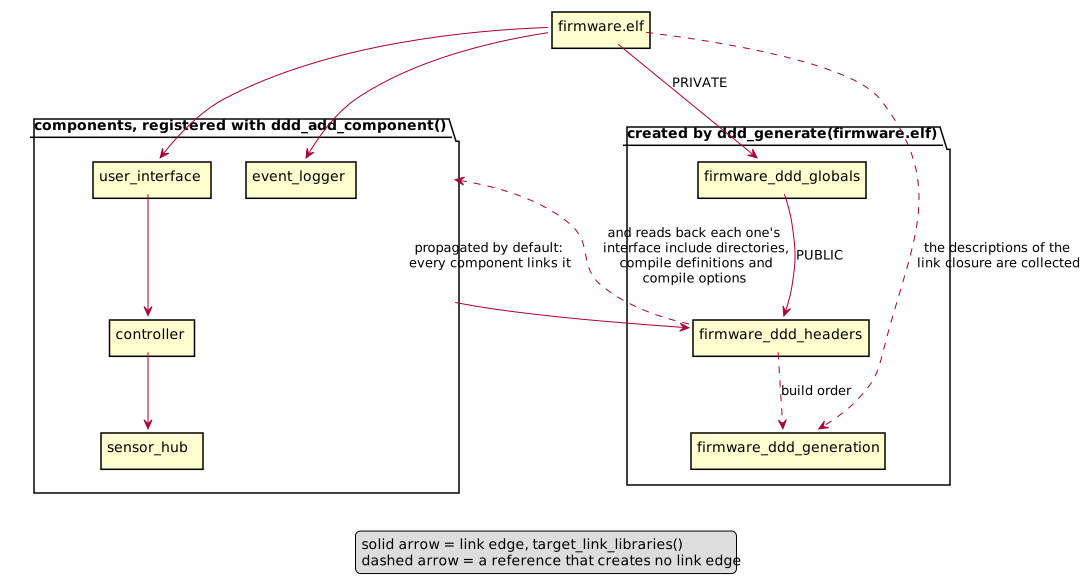
The two arrows between the components and firmware_ddd_headers are what reduce the
integration to two lines per component, and they are not a cycle. The components link the
interface library; the interface library names their usage through $<TARGET_PROPERTY:...>,
which is read at generate time and visits each target once. It is also the picture of what the
propagation costs: the usage collected on the right reaches every component on the left,
including the ones this image happens not to link.
target |
what it is |
|---|---|
|
custom target running the generator. It depends on the project description and the
files collected into it, on the templates, on a |
|
interface library carrying the include directory of the generated headers, and
depending on the generation. Every registered component links it, so a component
includes its interface header without knowing where the image put it. In the collected
mode it carries the interface compile usage of every registered component as well -
include directories, compile definitions and compile options, but never link edges - so
that a header an external type names is found and read the
way the component declaring it reads it. The flags matter as much as the paths: a hand
written header may change its layout under the component’s interface defines, and a
file compiled without them finds every header, compiles cleanly, and lays the variables
out differently than the image using them. Carrying it here is what keeps the
integration a two-liner, since linking this one target is then enough; the price is
that every registered component compiles under the union of those flags, including
components it does not link itself. |
|
object library compiling every generated |
|
runs |
|
runs |
|
one per registered component, checking that component alone (see above). |
The outputs declared for the generator are the files the template names already give away, plus
the a2l and the dictionary. The per-component headers are written next to them, but their names
come from inside the description files and are therefore unknown at configure time - which is
precisely why a consumer depends on <stem>_ddd_headers rather than on an individual header
path.
That leaves the build system unable to clean a header whose component has left the image, which
is why ddd generate cleans it itself: it owns its output directory, records what it wrote
there and removes, on the next run, the files it no longer writes (see
What a run owns). Dropping a component from target_link_libraries therefore takes
its header out of the include path of every other component at the next build, and
ninja -t clean followed by a build leaves what a build from nothing leaves - the record
survives the clean, being no more a declared output than the headers it names.
The path of the generated a2l is published as the DDD_A2L property of the image, so that a
post-build step can pick it up without rebuilding the path by hand:
get_target_property(a2l firmware.elf DDD_A2L)
install(FILES "${a2l}" DESTINATION delivery)
Beside the artefacts the generation step writes <project name>.dictionary.json - the
name the a2l takes, which beside PROJECT is the one written inside that file rather than
NAME - the resolved
data dictionary they were all generated from: what a template author
reads to see what the templates receive, and what a delivery archives for a later
ddd compare (see Comparing deliveries). The generation writes it itself, with
ddd generate --dictionary, in the same write as the artefacts: one analysis and one report
of the findings, and a run that fails its checks writes none of them, so the last dictionary
keeps describing the artefacts still beside it; a regeneration that changes nothing in it
leaves the file untouched. Its path is the DDD_DICTIONARY property of the image, read the
same way, and NO_DICTIONARY leaves the file and the property out.
Note
Multi-config generators are refused with a fatal error: the project description and the generated sources are written to configuration-agnostic paths, which the configurations would fight over. Use a single-config generator such as Ninja.
Options
option |
meaning |
|---|---|
|
use this project description instead of collecting the link closure. |
|
the plugins of the collected project: a |
|
project name, and therefore the name of the a2l file and of the dictionary beside it.
Defaults to the image name without its extension, with anything that is not a c
identifier replaced, because the name ends up as the a2l project and module name.
Ignored together with |
|
where the generated files go; defaults to |
|
required: the jinja2 templates the c sources are rendered from. Their names decide which files are generated, and renaming a template is how a project renames a generated file. |
|
write the json schemas of the file formats into this directory at configure time, for
editor validation; they are rewritten on every configure, so they cannot describe a
version of DDD that is no longer installed. They are closed over the project’s plugins
- the |
|
the symbol to address map filling the addresses into the a2l, written by a step of the
project’s own (below). A map inside the build tree that does not exist at configure
time is seeded with an empty map ( |
|
byte order reported in the a2l. |
|
severity overrides, exactly like |
|
usage requirements for compiling the generated definition file, stated by hand. The
manual fallback: in the collected mode |
|
additional files that retrigger the generation. |
|
declare input variables |
|
do not generate the a2l file; no |
|
do not write the resolved data dictionary beside the artefacts; no |
|
treat DDD warnings as errors. |
|
do not hand |
A keyword given no value is a fatal error naming it, in both calls. ADDRESS_MAP
${DDD_MAP} with DDD_MAP unset or empty - the ordinary CMake mistake - reads to
cmake_parse_arguments() exactly like a keyword nobody gave, so it used to be dropped in
silence: the a2l came out with every address 0x00000000, no map was seeded and none was a
dependency, and the two-run flow below never happened. PROJECT without a value fell into
the collected mode and generated out of the link graph instead of out of the file the caller
meant.
NO_PROPAGATE_HEADERS is the option a project building several images from the same
components cannot avoid. A component’s interface header is generated for one link closure, so
two images produce two different sets of headers for the same component, and whichever include
directory reached it first would silently decide which set it compiles against - and, since
<stem>_ddd_headers carries the components’ compile usage too, under which flags. Rather
than letting an include order settle that, the second ddd_generate() stops the configure
step with a fatal error. Such a project gives NO_PROPAGATE_HEADERS to both calls and links
the wanted <stem>_ddd_headers into each component explicitly - opting out of only one of
the two would leave the same ambiguity in place, because the automatic set still reaches every
registered component rather than only the ones that image links.
Where the address map comes from
ADDRESS_MAP names a file; writing it is the project’s step. DDD ships no extractor and
runs no toolchain tool of its own - it reads no build output at all - which is what lets the
generator run before anything has been compiled, and what leaves this half of the two-run flow
to the build. What it needs is the json Generated artefacts describes, one flat object
of symbol to address; where that comes from is the project’s business, so a toolchain without
nm costs nothing but the recipe below.
The step belongs after the link, so it is a POST_BUILD command on the image, writing into
the very path ADDRESS_MAP names:
set(address_map "${CMAKE_CURRENT_BINARY_DIR}/ddd/firmware.elf/addresses.json")

ddd_generate(firmware.elf
             TEMPLATE_DIRECTORY "${templates}"
             ADDRESS_MAP "${address_map}")

add_custom_command(TARGET firmware.elf POST_BUILD
                   COMMAND "${CMAKE_COMMAND}"
                           -D "NM=${CMAKE_NM}"
                           -D "IMAGE=$<TARGET_FILE:firmware.elf>"
                           -D "OUTPUT=${address_map}"
                           -P "${CMAKE_CURRENT_SOURCE_DIR}/cmake/AddressMap.cmake"
                   COMMENT "Extracting the address map of firmware.elf"
                   VERBATIM)
The script it runs is where the toolchain shows through, and it is an example to adapt
rather than a file to copy: this one reads the nm of binutils, and a toolchain whose
symbol lister prints something else needs its own reader of that output.
# cmake/AddressMap.cmake - NM, IMAGE and OUTPUT come from the -D arguments above.
execute_process(COMMAND "${NM}" --defined-only --extern-only --format=posix "${IMAGE}"
                OUTPUT_VARIABLE listing
                COMMAND_ERROR_IS_FATAL ANY)
string(REGEX REPLACE "\r?\n" ";" lines "${listing}")
set(entries "")
foreach(line IN LISTS lines)
    # "<name> <type> <address> <size>", the type letter saying which section it landed in.
    if(line MATCHES "^([A-Za-z_][A-Za-z0-9_]*) [BbDdGgRrSs] ([0-9A-Fa-f]+)")
        list(APPEND entries "  \"${CMAKE_MATCH_1}\": \"0x${CMAKE_MATCH_2}\"")
    endif()
endforeach()
list(JOIN entries ",\n" body)
file(WRITE "${OUTPUT}" "{\n${body}\n}\n")
The first build then links with every address 0, this step writes the map, and the next build regenerates - the map is one of the generation’s dependencies - and re-renders the a2l with the addresses in it. The c sources of that second run are byte identical, so nothing is recompiled, nothing is relinked, and the flow settles after one extra round rather than chasing its own tail.
--extern-only keeps the file-local statics out: every object a dictionary describes is a
global, and two translation units each defining a static of one name would otherwise hand
the map one symbol at two addresses, which load_address_map refuses.
Two things such a script has to get right. A structured object’s members are addressed under
their access path, Inlet.latest rather than Inlet, which a symbol lister does not
print: a project with structured objects adds the member offsets itself, from the type
description or from the debug information. And the addresses of the objects DDD does know
have to fit the 0 .. 0xFFFFFFFF of an ECU_ADDRESS, which a host build of an embedded
project runs into first: a 64 bit image is based above 4 GB, and no a2l can describe it. An
entry for a symbol DDD does not know is neither weighed that way nor written anywhere, so
listing the whole image does no harm; those entries are named in the note under
address-missing, where a stale or renamed symbol is read beside the object it belongs to.
docker
Generated c code is only worth something if a compiler accepts it, and “it compiled on my machine” is not a statement anybody can act on. The repository therefore ships a small linux image whose whole purpose is to generate, compile, link and inspect the result on a defined toolchain, and a compose file that gives every routine job a name.
The image (docker/Dockerfile) is python:3.12-slim-bookworm with gcc and libc6-dev to
compile the generated sources, and binutils for the nm that inspects them afterwards. DDD
itself is installed with its development extra, which is also where the cmake and the ninja
that build the cmake example come from: both are wheels from pypi rather than debian packages,
because debian bookworm still ships cmake 3.25 and the module needs 3.30. docker/compile.sh
is installed as the command ddd-compile. The image serves ddd gui too: its pages are
compiled in an earlier stage of the same file, which has Node.js and is thrown away, and only
the pages reach the image, installed with DDD.
Note
The image is a linux image, so on a Windows host run docker from a WSL shell, where docker speaks linux containers:
wsl -d Ubuntu
cd /mnt/c/path/to/ddd        # the working tree, seen from inside WSL
docker compose build
docker compose run --rm check           # ddd check on the demo project
docker compose run --rm generate        # ddd generate into build/gen
docker compose run --rm compile         # generate + compile + link + verify
docker compose run --rm compile-const   # the same, with --const-inputs
docker compose run --rm cmake           # configure and build examples/cmake
docker compose run --rm test            # pytest with the coverage gate
docker compose run --rm coverage        # the same, plus build/htmlcov/index.html
docker compose run --rm lint            # ruff check, ruff format --check, mypy
docker compose run --rm docs            # this documentation, into build/docs/html
docker compose run --rm ddd ddd list examples/demo/demo.ddd.json
The working tree is bind mounted at /work and PYTHONPATH=/work/src makes it shadow the
copy installed into the image, so a change to the sources takes effect without rebuilding
anything. The docs service runs sphinx-build with -W on the documentation
requirements the image carries, installing nothing, so a warning - a broken cross reference, a
directive that does not render - fails the build rather than producing a page nobody looks at
twice. There is also a shell service, which is the same container with an interactive bash
in it.
The pages of ddd gui are shadowed with the rest: a service serves the ones compiled in the
working tree, which git ignores, so over a checkout that never compiled them ddd gui refuses
to start there, and the pages the image carries are what a container run without that
PYTHONPATH serves. Either way it answers on the loopback address of the container by default,
which a browser outside the container reaches only if the container shares the host’s network.
The gui service is the exception: it clears PYTHONPATH, so it runs the image’s own code
and serves the pages it carries rather than the working tree’s, and it passes --host 0.0.0.0
so it answers beyond its own loopback. The project it opens is still the checkout’s, though:
examples/demo is bind mounted under /work like every service’s sources, so an edit made
in the browser is written into the developer’s own checkout there, the file keeping its owner and
permissions although this service runs as root, as every service does. docker compose up
gui builds the image first - the code it runs is the image’s, so an image built before a
change would serve what it was built from - and starts it, publishing the same port number on the host’s loopback
alone, -p 127.0.0.1:8123:8123 - a different number outside would have the Host header
ddd gui sees name a port it is not listening on, answered 421 misdirected request, and
beyond the container’s loopback the token in the address it prints is the only guard, which is
why nothing wider is published. Opening that address in a browser on the host is the image’s own
ddd gui serving the checkout’s demo project.
What the compile service proves
compile runs docker/compile.sh, which is deliberately more suspicious than a plain
build:
it generates the demo project into
build/genwith the templates named byTEMPLATES, the examples shipped with the tool unless the caller says otherwise, and writes the resolved dictionary next to it withddd dump --format json;it writes one translation unit per generated header which includes that header twice, which proves both that every header is self contained - it compiles with nothing included before it - and that its include guard works;
it compiles everything with
-std=c11 -Wall -Wextra -Wpedantic -Werror -Wconversion -Wshadow -Wcast-qual
-Wstrict-prototypes
, so a conversion the generator got wrong is a compile error and not a silent truncation on the target;it links all the objects into one binary and runs it, which is where a duplicated definition or a declaration without a definition behind it would show up - the link step is what actually tests the promise that every variable is defined exactly once;
it compares the output of
nmon the generated definition file against the dictionary from step 1 (docker/verify_symbols.py): every declared variable must be defined exactly once, nothing that DDD never declared may be defined, and a variable behind a preprocessor condition is allowed to be absent and is reported as such.
Steps 2 to 5 run twice, once plain and once with the extra defines from the CDEFS
environment variable - -DFEATURE_X in the shipped compose file - so that conditional
declarations are covered in both of their states.
The dictionary rather than ddd list in step 1, because the two count different things: the
definition file defines one symbol per plain object and one per structured instance, while
the list reports what can be described, which for a structured object is its leaves - and a
structure whose members are all external types has storage the linker sees and no leaf at all.
The script takes the project and the output directory as arguments, so it also runs on a real
project rather than only on the demo, and the environment variables CDEFS, GENFLAGS,
TEMPLATES, CFLAGS, CC and INCLUDES change the defines, the ddd generate
flags, the templates, the warning set, the compiler, and where the headers of the project’s
external types are looked for on top of the nearest include directory:
docker compose run --rm compile ddd-compile path/to/project.ddd.json build/mine
docker compose run --rm -e TEMPLATES=path/to/templates compile \
    ddd-compile path/to/project.ddd.json build/mine
TEMPLATES defaults to the output of ddd templates-dir, which is what makes the plain
invocation work at all - the generator itself has no templates to fall back on. The second form
is the interesting one for a real project: it answers whether the code that project is about to
ship compiles, links and defines every symbol it promised, and that is a question the example
templates cannot answer on its behalf.
Warning
The container runs as root, so files it writes under build/ belong to root when the
mount is a real linux filesystem. The base images are also still referenced by tag -
python’s, and node’s for the stage that compiles the pages: pin them to digests before a
result from the image is used to release something, as the comment at the top of
docker/Dockerfile describes.
pre-commit
An identity only does its job if every object has one, and the moment a project forgets is the
moment somebody adds an object without one - which nothing notices until a rename two releases
later reads as a removal and an addition. ddd id --assign closes that gap from the command
line; a pre-commit hook closes it without anyone remembering to.
This repository publishes the hook, so a project that uses DDD adds it by naming this repository rather than writing an invocation of its own:
repos:
  - repo: https://github.com/Sauci/ddd
    rev: <the release you pin>
    hooks:
      - id: ddd-id
pre-commit passes the staged *.ddd.json files, and the hook stamps an id into every
producing declaration that has none. A project, types or units file among them is a no-op: only
a component file declares data objects.
The hook is a language: python hook, so pre-commit builds it an environment of its own out
of whichever interpreter it finds, and DDD needs Python 3.12 or newer. On a machine whose
default python3 is older - Ubuntu 22.04 ships 3.10 - pre-commit install-hooks fails
inside pip with “requires a different Python” and names no file of yours. Pin the interpreter
in the hook entry rather than in the machine:
repos:
  - repo: https://github.com/Sauci/ddd
    rev: <the release you pin>
    hooks:
      - id: ddd-id
        language_version: python3.12
The commit then fails, and that is the intended behaviour. pre-commit reports files were
modified by this hook whenever a hook changes something on disk, even when the hook itself
succeeded. So the new ids arrive in the working tree for their author to read and stage, rather
than in a commit nobody reviewed - which is the same bargain ddd id --assign is built on:
the tool proposes, the diff is reviewed, a git checkout undoes it. Run git add and
commit again.
This is the one part of DDD that assumes git, and only because pre-commit is a git mechanism. The tool itself reads no repository and knows nothing about version control.